
zCAD / CLOUD-NATIVE ENGINEERING

TWO MATURE CAD PRODUCTS. TWO WAYS TO BEGIN.

Create precise parametric parts, assemblies, and drawings in the browser with zCAD Online. Use zCAD AI for a prompt-led approach to structured CAD modeling.

01Design in the browser

Start a parametric model directly in zCAD Online without a desktop CAD installation.

02Build precise geometry

Work with dimensions, constraints, features, parts, assemblies, and drawings.

03Keep work connected

Use automatic saving, versions, permissions, comments, and browser-based review.

04Model from engineering intent

Use zCAD AI to generate, inspect, and revise structured CAD through a prompt-led workflow.

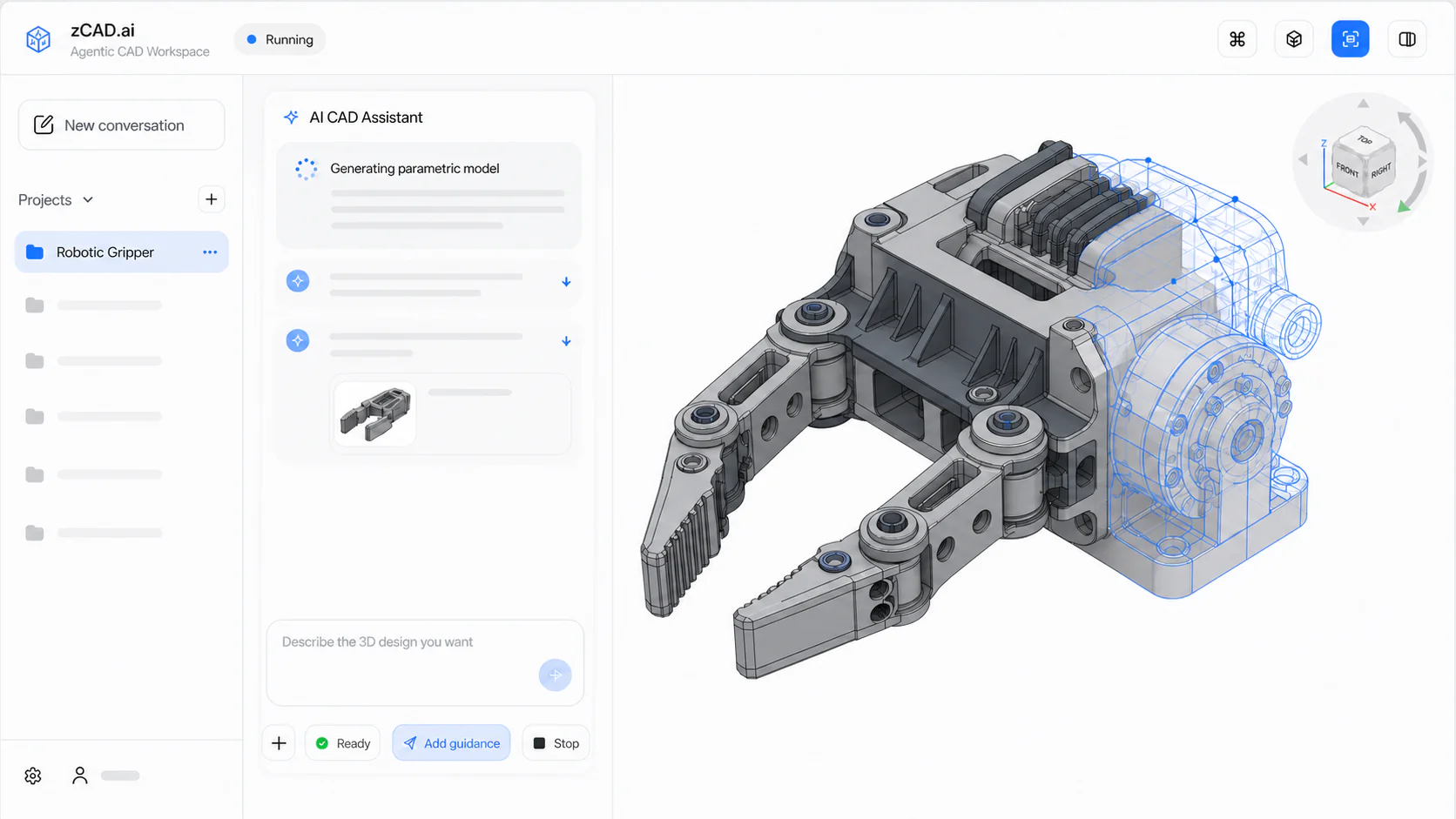
zCAD AI workspace showing prompt-led structured CAD modeling
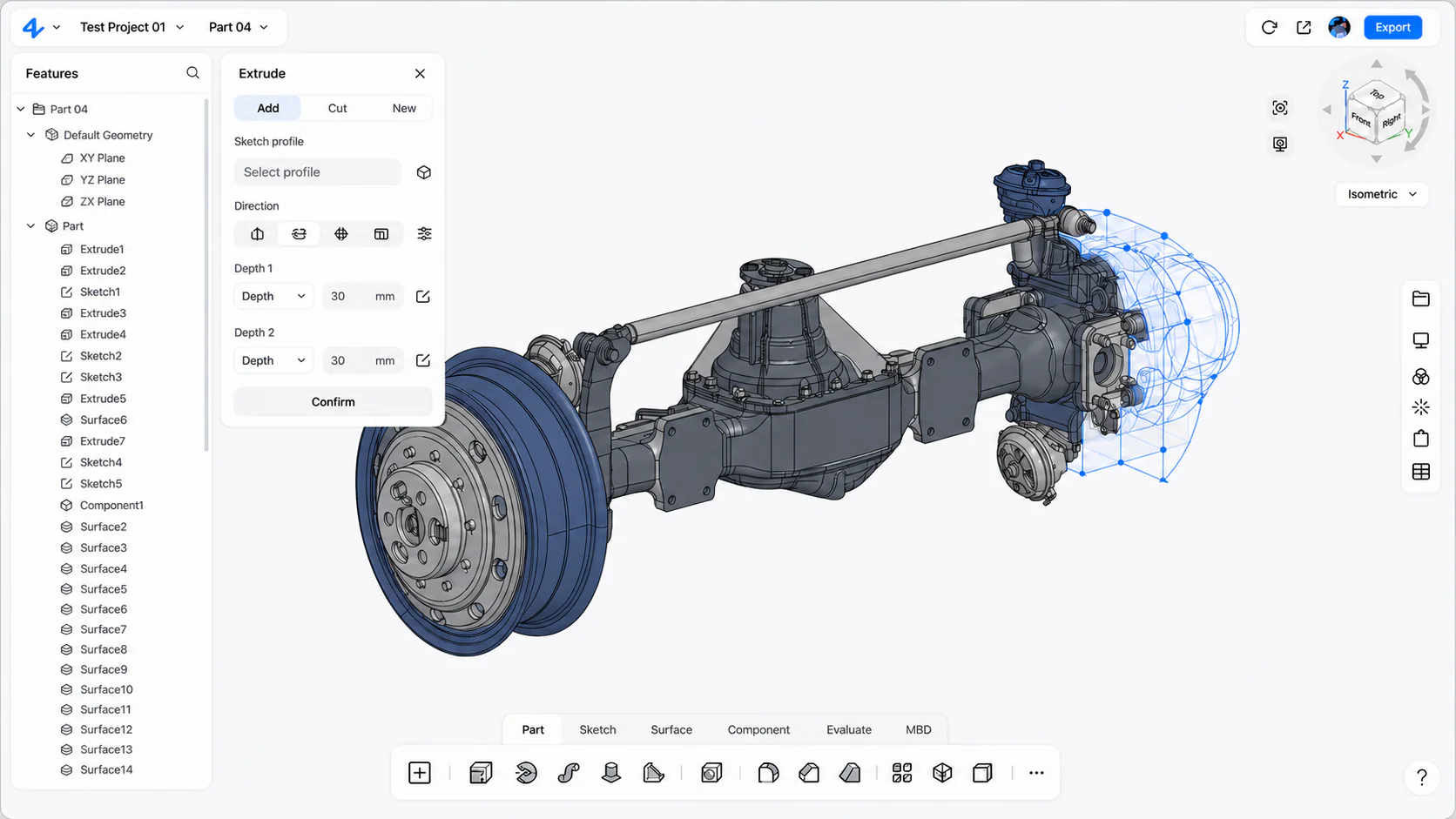
zCAD Online workspace showing a multi-part automotive axle assembly

zCAD AI / PROMPT-LED STRUCTURED CAD

Begin with engineering intent.

Describe what the part must do, inspect the structured CAD result, and continue through controlled follow-up changes toward manufacturing.

Engineering intent

Describe the part, its function, interfaces, dimensions, and conditions that matter.

Structured CAD

Inspect the Feature Plan, geometry, dimensions, and relationships behind the generated result.

Controlled revision

Change a requirement while preserving the interfaces and conditions that must remain fixed.

zCAD ONLINE / DIRECT PARAMETRIC AUTHORING

Build the model directly.

Model precise parts and large assemblies, create engineering drawings, manage versions, and collaborate with the team in one cloud-native workspace.

Parts and large assemblies

Create precise features and product structures from imported CAD or a blank project.

Specialized engineering tools

Develop sheet metal, weldments, freeform surfaces, drawings, and detailed engineering geometry.

Real-time collaboration

Keep simultaneous editing, permissions, automatic saving, versions, comments, and review connected.

Two products / One engineering purpose

Choose how the modeling work begins.

Start with direct parametric authoring in zCAD Online, or begin with engineering intent in zCAD AI. Both products are built for CAD work that must remain understandable through inspection, revision, and delivery.

01

Choose a product

Two zCAD products, built for different ways of starting

Some CAD work begins with direct control over sketches, dimensions, features, components, and drawings. Other work begins with a clear engineering requirement that still has to be translated into a model. zCAD provides a focused product for each starting point.

01

zCAD Online

zCAD Online is browser-based parametric CAD for direct mechanical design. Create feature-based parts, organize multi-level assemblies, develop specialized geometry, and prepare engineering drawings. Project history, access, comments, sharing, and review remain available beside the model as the design changes.

Choose zCAD Online when you want to author the model directly, control its parametric definition, develop a product structure, document the design, or work with a team around the same browser-based project.

Explore zCAD Online
02

zCAD AI

zCAD AI is prompt-led CAD modeling for work that begins with engineering intent. Describe what the part must do, generate a structured CAD result, inspect it against the requirement, and continue the revision through follow-up prompts.

Choose zCAD AI when the requirement is already clear but translating it into a conventional sequence of planes, sketches, constraints, and features would slow down the first model or the next change.

Explore zCAD AI
02

One decision / Two paths

One engineering decision, two ways to start

A useful CAD model carries more than visible shape. Dimensions define size. Constraints preserve relationships. Features record how geometry was built. Assembly structure shows where each component belongs. Drawings communicate the definition to people working beyond the 3D model. This structure becomes valuable when the requirement changes and the next decision has to be made without losing the logic behind the first one.

Consider a mounting bracket inside a larger machine. A supplier moves the mounting interface, but the hole pattern, component clearance, and surrounding assembly envelope must remain controlled. The task can begin through either zCAD product, depending on how the engineer wants to work.

  1. 01

    Direct parametric authoring in zCAD Online

    Open the browser workspace, locate the bracket in the assembly, and return to the sketch, dimension, reference, or feature that controls the interface. Inspect the surrounding components while the product structure remains visible. Update the related drawing, preserve the new project state in version history, and bring the revised geometry into review with the reason for the change still available.

    The modeling canvas, assembly hierarchy, feature history, drawing, and project context form one continuous path. Direct control remains with the engineer, while the browser project keeps the work around the model connected.

  2. 02

    Prompt-led modeling in zCAD AI

    Begin with the same engineering requirement in natural language: describe the bracket’s function, mounting interfaces, controlled dimensions, clearance, and the relationships that must remain fixed. zCAD AI turns that request into structured CAD and presents the model or Feature Plan together with the geometry that needs to be checked.

    The user measures the important conditions, identifies any missing assumption, and continues with a follow-up prompt that changes the interface while preserving the hole pattern and clearance. The prompt, model, inspection, and revised state appear as one connected sequence, making the translation from written intent to editable geometry visible.

  3. 03

    Structure makes the next revision understandable

    The two products begin differently, but both treat the first result as the start of continued engineering work. A controlled feature, dimension, project version, or modeling prompt gives the next change a clear entry point. The value is not a more technical-looking first model. It is a product definition that can still be understood when suppliers, reviewers, manufacturing teams, or new requirements create another decision.

03

Cloud-native workflow

Browser-based CAD changes more than where the software opens

Opening CAD in a browser removes the desktop installation from the beginning of the workflow, but cloud-native engineering is not only an access claim. Its practical value comes from keeping the current project and its surrounding work available in one environment.

With zCAD Online, the model, automatic saving, version history, permissions, comments, sharing, and review stay connected to the browser project. An engineer can continue authoring the design while a reviewer works from the current context rather than requesting another exported copy. A team can return to an earlier state without treating filenames as a version system. Access can be managed around the project instead of around an uncontrolled chain of attachments.

This does not remove the need for engineering judgment, controlled release, or supported data exchange. It reduces the administrative friction between those decisions. The objective is simple: spend less time identifying the right copy and more time evaluating the actual design.

04

Built for engineering roles

Built for people who make and evaluate physical products

01

Product designers

Move from requirements and concepts into editable product geometry. Explore proportions and mechanisms without losing the dimensions and relationships required for continued engineering work.

02

Mechanical engineers

Create and revise parametric parts, assemblies, detailed geometry, and drawings. Inspect how a changed feature or interface affects the rest of the product definition.

03

Engineering teams

Keep current product data, versions, review context, and documentation available as more contributors join the project. Make design feedback easier to evaluate against the model it refers to.

04

Engineering and CAD managers

Assess how modeling, product structure, data access, review, and change management fit together. Choose the zCAD product according to the work the team needs to perform, not according to a generic software category label.

05

Choose by task

Choose by the task in front of you

  • zCAD Online: Build and control sketches, dimensions, features, parts, assemblies, engineering drawings, versions, comments, permissions, and review.
  • zCAD AI: Turn a written part requirement into structured CAD, then inspect and continue the model through follow-up prompts.
  • Online CAD Viewer: Open and inspect existing 3D data without authoring.
  • Solutions: Explore an engineering workflow for a particular industry.

If a task combines several needs, begin with the activity that requires authorship. Choose zCAD Online for direct parametric control and connected project work, or zCAD AI for prompt-led generation and revision. Use the viewer when inspection is the complete task, and use Solutions to see how the workflow changes by industry.

A team can use either modeling product for the task in front of it without treating one workflow as a prerequisite for the other.

06

Industry context

Engineering work changes by industry

A machine builder may need configurable assemblies, fabricated structures, drawings, and repeated engineering change. An electronics team may focus on enclosures, internal packaging, interfaces, and clearances. A robotics team may work across brackets, fixtures, end effectors, access around fasteners, and multidisciplinary review. A consumer-product team may move repeatedly between exterior form, mechanisms, variants, prototypes, and manufacturing feedback.

The product foundation is shared, but the sequence of decisions is different. The zCAD solution pages follow those industry-specific paths from design and documentation into review, change, and delivery.

07

Evaluate and explore

Learn, inspect, and evaluate before the next project

Use the Help Center for product guidance and modeling workflows. Read zCAD resources for practical explanations of parametric CAD, AI CAD, design review, and engineering change. Open the online CAD viewer when the current task is inspection rather than authoring. Each route provides a next step matched to what the visitor needs to accomplish.

08

zCAD / Product system

Frequently asked questions

What is zCAD?

zCAD is a product brand for browser-based CAD. Its two products are zCAD Online, for direct parametric mechanical design and connected engineering workflows, and zCAD AI, for prompt-led structured CAD modeling.

Is zCAD a CAD viewer or CAD modeling software?

zCAD Online is a full browser-based parametric modeling workspace, not only a viewer. zCAD also provides a dedicated viewer route for tasks that require opening and inspecting CAD without authoring a model.

What does cloud-native parametric CAD mean?

Parametric CAD represents geometry through dimensions, constraints, features, references, and editable relationships. Cloud-native means the product is designed for browser access and cloud project workflows, including connected saving, versions, permissions, comments, sharing, and review in zCAD Online.

Which zCAD product should I choose?

Choose zCAD Online for direct parametric authoring, assemblies, drawings, versions, and browser-based project work. Choose zCAD AI when the task begins with a written engineering requirement and continues through prompt-led generation, inspection, and revision.

Who is zCAD for?

zCAD is for product designers, mechanical engineers, engineering teams, reviewers, and managers working with precise product geometry, assemblies, drawings, versions, and continuing engineering change.

09

zCAD / Product system

Choose the zCAD product for your current task

Create and develop parametric product data directly in zCAD Online, or begin with engineering intent and prompt-led structured CAD modeling in zCAD AI.

Compare the workflows above, then open the product that matches how you want to begin the model and control the next engineering change.